

PixelTrack
Loading app data…
Discord - Talk, Play, Hang Out icon

Discord - Talk, Play, Hang Out

com.discord · Discord Inc.

Current version ?
340.13 - Stable
Rating
4.3 ★★★★★319,172 reviews
Downloads
500,000,000+Google Play range
Monetization
Last tracked

Discord - Talk, Play, Hang Out New Features & Updates

July 2026

Discord's July 2026 update brings a mix of performance improvements and practical fixes across desktop and mobile platforms. The headline changes focus on faster startup times and smoother session connections, alongside a significant architectural shift on iOS.

Performance and Architecture

The app now launches faster and establishes session connections more quickly. On iOS, Discord has adopted React Native New Architecture, which modernizes the underlying framework for better responsiveness and future development flexibility.

Messaging Improvements

Message forwarding now supports the @silent tag. When you forward a message with this tag, the recipient won't receive a notification ping, making it useful for sharing content without interrupting someone's focus. The feature works directly from the message forwarding menu.

Channel Pinning

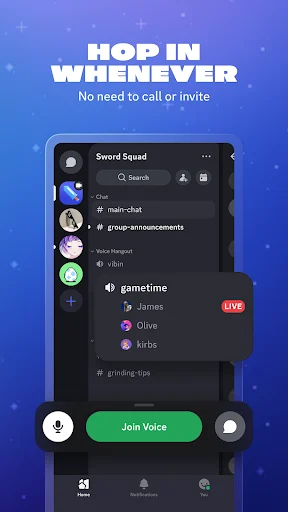
Channel Pinning is now available for all servers. Server admins and members with appropriate permissions can pin channels to the top of their channel list, providing quick access to frequently used spaces. This feature was previously limited to certain server configurations.

Platform-Specific Fixes

Several bugs were resolved across platforms in recent patch cycles:

Desktop: Fixed an issue where profile badges displayed in a different order than on mobile. Also resolved a scrollbar overlap problem on full profile pages and corrected a bug where the Space Between Message Groups slider didn't update immediately when switching between Cozy and Compact display modes.

Android: Server list reordering now scrolls at an improved speed. Adding a friend via QR code now provides visual confirmation that the request was sent. Text fields in app pop-up forms no longer get hidden behind the keyboard. The Create Thread screen icon displays with proper colors, and blockquote borders no longer show through unrevealed spoilers.

iOS: Profile effects no longer cover buttons in a user's profile, keeping interactive elements accessible.

Additional Notes

The July 7 patch notes also mention fixes for desktop profile card scrolling and general reliability improvements. Discord continues to publish detailed patch notes on their blog, and users can check "What's New" in their profile settings within the app for version-specific information.

The update is rolling out across Windows, Android, and iOS platforms, with version numbers varying by platform.

Previous updates1 article

July 2026

Discord’s latest patch notes landed this week, and they’re a mixed bag of long-requested features and overdue fixes. The headline addition is channel pinning for every server, not just Community-enabled ones. That’s a quality-of-life change that should have been obvious years ago. You can now pin your most-used channels to the top of the list on any server you frequent. No more scrolling past twenty channels to find the one your group actually talks in.

The update text also points to a fix for the You Bar opening multiple profile cards at once. That bug was one of those minor annoyances that built up over time—click a friend’s avatar, get two profile popups, close one, the other stays stuck. It’s gone now, apparently.

Code blocks in light mode were apparently hard to read. I don’t use light mode, but the developers who do must be relieved. The patch notes mention this was fixed, though they don’t specify how. Better contrast, presumably.

Forum channels lagging due to high-res images got addressed too. The official Discord blog from July 7 confirms this was an Android-specific issue where opening forum channels packed with high-resolution images caused severe lag. The fix involves serving appropriately sized images instead of the originals. That’s sensible engineering.

A broader set of changes appears in the Releasebot summary, which describes faster app startup and session connections, plus React Native New Architecture on iOS. These are the kind of under-the-hood improvements that don’t show up in the UI but make the app feel snappier. Message forwarding with @silent is also mentioned, which lets you forward messages without pinging everyone in the channel.

The patch notes from June 4 and April 6 fill in some gaps. Desktop users got keyboard-only navigation for the Chat and Invite to Voice buttons in active voice channels. Screen reader support improved for channel header buttons. A crash on Android when selecting options from bot string-select menus was fixed. iOS got emoji-only button padding corrections and a fix for the Report a Problem button on Game profiles.

There’s also a mention of fixing in-app notifications disappearing immediately when Reduce Motion was enabled. That’s an accessibility win, even if it’s a niche one.

The Reddit bug megathread for June and July flags a thread-related visual issue with gradient themes on iOS. A colored bar appears where emojis and following buttons should be. It’s unclear if this is fixed in the current update or still outstanding.

My take: channel pinning for all servers is the real story here. It’s one of those features that makes you wonder why it took this long. The rest is standard maintenance—dozens of fixes across platforms, most of which you’ll never notice unless they affected you personally. That’s fine. That’s how good software works.

Metrics trends

Over the last 60 days, PixelTrack observed changes in estimated installs, rating, rating count and review count. The table compares the earliest recorded changed value with the latest observation.

MetricEarlier valueLatest valueChangeLatest change
Estimated installs674,767,887678,779,244+4,011,357Aug 7, 2026
Rating4.34.29-0Aug 7, 2026
Rating count6,902,6196,930,552+27,933Aug 7, 2026
Review count318,883319,506+623Aug 7, 2026

Discord - Talk, Play, Hang Out Changelog

5 changes

Version 340.13 - Stable Update

What’s new

We’ve been hard at work making Discord better for you. This includes bug fixes and performance enhancements. For more detailed information, go to your profile in the app and scroll down to “What’s New”.

Version 339.11 - Stable Update

What’s new

We’ve been hard at work making Discord better for you. This includes bug fixes and performance enhancements. For more detailed information, go to your profile in the app and scroll down to “What’s New”.

Version 338.13 - Stable Update

What’s new

In recent updates, we fixed the You Bar opening multiple profile cards at once, code blocks being hard to read in light mode, and forum channels lagging due to high-res images. Plus, you can now pin your favorite channels to the top of the list on ANY server, not just Community-enabled ones. Pin dis.gd/PatchNotes to your browser’s favorite list to always know what we’ve updated lately

Version 337.10 - Stable Update

What’s new

We’ve been hard at work making Discord better for you. This includes bug fixes and performance enhancements. For more detailed information, go to your profile in the app and scroll down to “What’s New”.

Version 336.10 - Stable Update

What’s new

We’ve been hard at work making Discord better for you. This includes bug fixes and performance enhancements. For more detailed information, go to your profile in the app and scroll down to “What’s New”.